How Smart Tech Makes Wedding Planning Easier and More Fun
For newly engaged bridal couples and the friends or family helping them, wedding planning challenges often show up as a pile of event organization hurdles that feel bigger than the celebration itself. Decisions stack up fast, venues, vendors, budgets, timelines, and it’s easy to lose track of what matters while trying to keep everyone aligned. As modern wedding trends lean more digital, the wedding technology benefits are becoming a practical way to bring clarity, cut down on back-and-forth, and make planning feel more manageable. Smart tech can turn scattered ideas into a calmer plan.
Understanding Smart Wedding Planning Tech
Smart wedding planning tech is a set of tools that helps you turn ideas into clear choices. It includes AI generated wedding visuals for quick style mockups, virtual venue tours for realistic walk throughs, and planning software that keeps tasks, budgets, and messages in one place. At the center is AI technology that can suggest options and organize information faster than a manual checklist.
This matters because inspiration is easy to collect, but decisions are harder to lock. When you can preview a look, confirm a space, and track next steps, you waste less time second guessing. It also makes it easier for partners and helpers to stay on the same page.
Picture a shared board where you generate three centerpiece styles, tour two venues online, then assign vendor follow ups in one app. Instead of debating abstract vibes, you choose one plan and move forward.
Wedding Tech Options Compared at a Glance
This table compares popular wedding tech options by the job they do best, so you can pick tools that remove friction instead of adding apps. Use it to match your biggest planning pressure point, like guest tracking or vendor search, to the simplest solution.
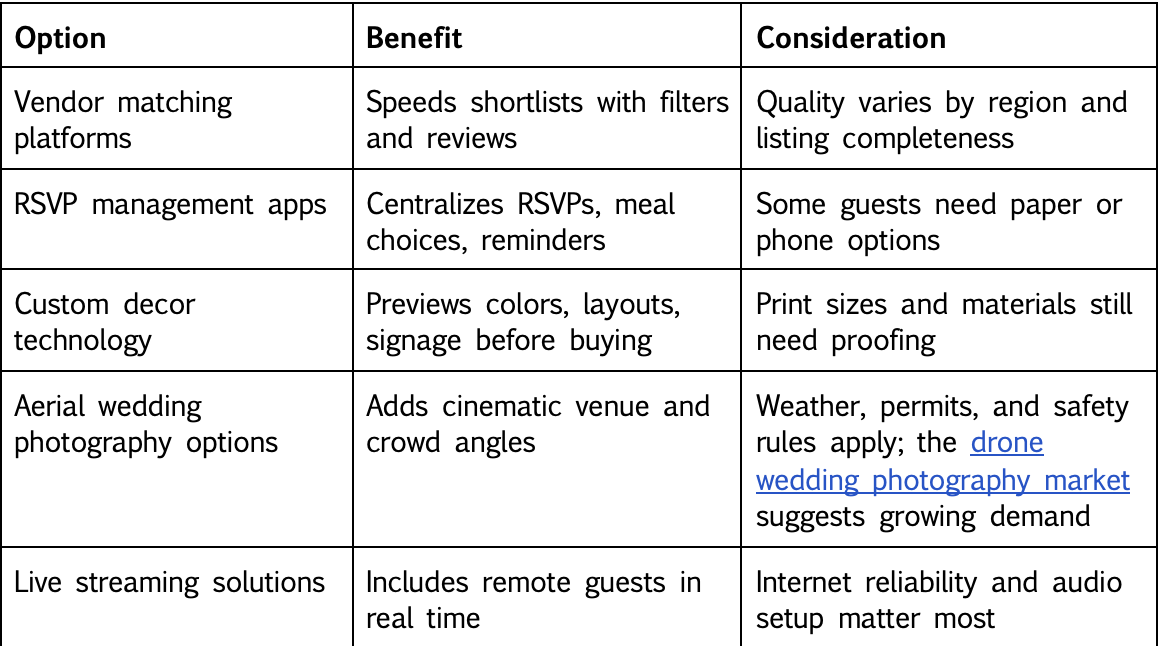
If your stress is “too many decisions,” start with vendor matching and an RSVP app to stabilize the basics. If your goal is “make it feel special,” add decor tech, then consider aerial shots or streaming based on your guest reality. Choosing one clear priority makes the next step feel easy.
Build a Wedding Look in 30 Minutes with an AI Design Flow
When you want a cohesive wedding look fast, a simple AI design workflow can turn your theme into visuals you can actually use, without getting stuck in endless scrolling or decision fatigue.
1. Write a “one-sentence vibe” and lock 3 style rules: Set a 5-minute timer and write one sentence that includes your theme, mood, and setting (example: “Modern garden party with soft pastels, airy florals, and clean typography”). Then pick three rules you won’t break, like 2–3 main colors, one font style direction, and one texture (linen, watercolor, foil). This gives every tool you try a clear target and makes the “tech options compared at a glance” choices easier because you’ll know whether you need design help, vendor help, or guest management most.
2. Create a mood board in 10 minutes, then ask AI to summarize it: Save 12–20 images into a single board (flowers, tablescapes, outfits, invitation styles, signage). This works because visual planning is already common, 67% of brides create mood boards. Once your board feels “close enough,” paste a few image descriptions (or your favorite 5) into an AI tool and ask for a tight style summary: color palette names, décor motifs, and “do/don’t” guidance.
3. Generate invitation + signage art from one reusable prompt: Take the style summary and make one master prompt you can reuse for custom wedding invitations, welcome signs, table numbers, and menus. Include: format ("5x7 invitation"), printing style ("high-contrast, minimal ink coverage"), and what to avoid (“no extra text, no blurry details, no random letters”). Do 3 quick variations (A/B/C) and choose one direction. Your goal is consistency, not 40 options.
4. Refine for print-ready clarity (the step people skip): Before you upload anywhere, zoom to 200–300% and check edges, small flourishes, and any “fake text” artifacts. If you see fuzziness, re-generate with instructions like “bold shapes, clean lines, flat background, no grain,” and keep the design simpler for anything guests will read at
arm’s length. Order one inexpensive proof print (or print at home) so you can confirm colors and legibility before committing.
5. Use digital décor customization where it counts most: Pick 2–3 high-impact touchpoints to customize digitally: a welcome sign, seating chart, and a bar menu or signature cocktail sign. Keeping it to a small set prevents the “customize everything” spiral and makes your design feel intentional across the day. Save each item in a
labeled folder (“Signage_Print”; “Signage_Screens”) so you’re ready for both print and display.
6. Pair your visuals with automated vendor matching and guest communication tools: Once your look is set, paste your style summary into vendor inquiries so florists, stationers, and rental teams can quote faster and more accurately. Teams that use AI-supported coordination often see a 30-60% reduction in ops workload, and you can borrow that idea by automating the repeatable parts: template messages, follow-up reminders, and a single FAQ you text or email guests. Use guest communication tools to send one update at a time (parking this week, timeline next week) so everyone stays informed without blowing up your group chat.
A tight style brief, a focused mood board, and a repeatable AI design workflow help you create polished visuals, potentially with an AI art generator, while keeping vendor and guest conversations organized, without adding extra stress when it’s time to think about cost, privacy, and backup plans.
Wedding Tech Questions Couples Ask Most
Q: How do I start using planning apps without getting overwhelmed?
A: Pick one “home base” tool for tasks and dates first, then add extras only if you feel a real gap. A good starting point is a wedding checklist that acts as a breakdown of all the tasks, so nothing falls through. Keep notifications minimal and schedule one weekly check-in to stay in control.
Q: What should I do about privacy when guests RSVP through an app or website?
A: Share only what you truly need: names, meal choice, and contact info for updates. Turn off public search indexing, use password protection, and limit who can download your guest list. If a feature feels invasive, skip it.
Q: How can I troubleshoot day-of tech issues fast?
A: Create a simple backup kit: printed vendor contacts, a paper timeline, and screenshots of key details. Download anything important for offline access, and assign one trusted person as “tech captain” with logins and charging cables.
Q: Can AI tools actually help, or will they make decisions harder?
A: Used lightly, they save time by offering drafts you can react to instead of starting from scratch. The Knot reports AI tools are increasingly common, so you are not alone in trying them. Set limits like three options maximum, then choose and move on.
Q: What’s good digital etiquette for wedding texts and group chats?
A: Send fewer, clearer messages: one update at a time with a subject line like “Parking” or “Timeline.” Avoid late-night pings, and keep sensitive topics out of group threads. For guests who do not use smartphones, offer a printed card or a single point of contact.
Simplify Wedding Planning With Smart Tech, Then Enjoy the Moment
Wedding planning can feel like a nonstop stream of decisions, messages, and “Did we miss anything?” moments, especially when tech questions and privacy worries pile on. The steadier path is embracing wedding innovation with a calm, intentional mindset: pick tools that simplify communication, keep information organized, and support stress-free wedding coordination. When that approach leads, simplified event planning becomes more reliable, and tech- enhanced wedding experiences feel like help, not homework. Use tech to reduce decisions, not add them. Choose one trusted planning hub and confirm it fits comfort levels for sharing, notifications, and guest access. That clarity makes space to celebrate now, and keeps the future of wedding technology focused on connection, not clutter.